- 编译环境:Windows 和 Linux 都可以,我用的是 Windows10 和 Ubuntu22.04。
- 安装环境:建议 Linux,我用的是 Ubuntu22.04;在 Windows 环境会出现更多问题,因很多依赖软件原本是在 Linux 环境运行的;
- Atlas 版本:V2.3.0;
- 安装方式:使用 BerkeleyDB 和 Apache Solr 打包安装 Apache Atlas。这种方式更适合做功能测试或演示,所以,如果在生产环境安装 Atlas,本篇文章的部分内容只能用作参考。
- 安装难点:a、官方不提供现成的安装包,需要自己先编译再安装,有一点难度;b、依赖于 Hadoop 生态里的一些软件,也增加了难度;
- 按照网上主流声音,采用内置 HBase 和 Solr 方式安装,没成功。卡在 HBase 启动,折腾来折腾去死活没成功。主要在于自己没有安装 Hadoop 生态的经验,直接上手 Atlas,遇到问题,只能死搬网上的解决方式;
一、下载源码
二、环境准备
- Jdk 1.8+
- Maven 3.5+
- Python 2.7+
三、编译 Atlas
Atlas 依赖 org.restlet.jee,Maven 官方仓库中没有,需要提前在本地仓库安装:
- Windows 里,可以直接到 Restlet 官网 下载,然后将 jar 安装到本地仓库;
- Linux 里,下载和安装都通过命令完成:
1
2
3
4
5
6
wget https://download.restlet.talend.com/2.4/restlet-jee-2.4.3.zip
unzip restlet-jee-2.4.3.zip
cd restlet-jee-2.4.3/lib
mvn install:install-file -DgroupId=org.restlet.jee -DartifactId=org.restlet -Dversion=2.4.3 -Dpackaging=jar -Dfile=org.restlet.jar
mvn install:install-file -DgroupId=org.restlet.jee -DartifactId=org.restlet.ext.servlet -Dversion=2.4.3 -Dpackaging=jar -Dfile=org.restlet.ext.servlet.jar - 注意:下载的是 jee 版,不是默认的 jse 版,否则第二个 jar 找不到。
通过 Maven 命令编译打包项目,如果本地有 HBase 和 Solr,可以采用第一种,否则建议采用优先级由高到低:第三种 > 第二种 > 第一种:
1
2
3
4
5
6
7
8
9cd 进入源码根目录,执行编译命令
mvn clean -DskipTests install
方式一,不内嵌 HBase 和 Solr,在生产环境采用,需使用本地的 HBase 和 Solr
mvn clean -DskipTests package -Pdist
方式二,使用嵌入式 Apache HBase 和 Apache Solr 打包 Apache Atlas
mvn clean -DskipTests package -Pdist,embedded-hbase-solr
方式三,使用 BerkeleyDB 和 Apache Solr 打包 Apache Atlas
mvn clean -DskipTests package -Pdist,berkeley-solr编译成功后,类似结果如下:
1
2
3
4
5
6
7
8
9
10
11
12
13
14
15
16
17
18
19
20
21
22
23
24
25
26
27
28
29
30
31
32
33
34
35
36
37
38
39
40
41
42
43
44
45
46
47
48
49
50
51
[INFO] Apache Atlas Server Build Tools .................... SUCCESS [1.640 s]
[INFO] apache-atlas ....................................... SUCCESS [5.569 s]
[INFO] Apache Atlas Integration ........................... SUCCESS [5.596 s]
[INFO] Apache Atlas Test Utility Tools .................... SUCCESS [2.472 s]
[INFO] Apache Atlas Common ................................ SUCCESS [2.532 s]
[INFO] Apache Atlas Client ................................ SUCCESS [0.211 s]
[INFO] atlas-client-common ................................ SUCCESS [0.685 s]
[INFO] atlas-client-v1 .................................... SUCCESS [1.200 s]
[INFO] Apache Atlas Server API ............................ SUCCESS [0.824 s]
[INFO] Apache Atlas Notification .......................... SUCCESS [5.717 s]
[INFO] atlas-client-v2 .................................... SUCCESS [1.309 s]
[INFO] Apache Atlas Graph Database Projects ............... SUCCESS [0.203 s]
[INFO] Apache Atlas Graph Database API .................... SUCCESS [1.409 s]
[INFO] Graph Database Common Code ......................... SUCCESS [1.496 s]
[INFO] Apache Atlas JanusGraph-HBase2 Module .............. SUCCESS [1.452 s]
[INFO] Apache Atlas JanusGraph DB Impl .................... SUCCESS [01:43 min]
[INFO] Apache Atlas Graph DB Dependencies ................. SUCCESS [1.596 s]
[INFO] Apache Atlas Authorization ......................... SUCCESS [0.931 s]
[INFO] Apache Atlas Repository ............................ SUCCESS [11.452 s]
[INFO] Apache Atlas UI .................................... SUCCESS [02:43 min]
[INFO] Apache Atlas New UI ................................ SUCCESS [57.174 s]
[INFO] Apache Atlas Web Application ....................... SUCCESS [04:20 min]
[INFO] Apache Atlas Documentation ......................... SUCCESS [4.282 s]
[INFO] Apache Atlas FileSystem Model ...................... SUCCESS [2.904 s]
[INFO] Apache Atlas Plugin Classloader .................... SUCCESS [1.139 s]
[INFO] Apache Atlas Hive Bridge Shim ...................... SUCCESS [3.530 s]
[INFO] Apache Atlas Hive Bridge ........................... SUCCESS [6.569 s]
[INFO] Apache Atlas Falcon Bridge Shim .................... SUCCESS [2.495 s]
[INFO] Apache Atlas Falcon Bridge ......................... SUCCESS [3.606 s]
[INFO] Apache Atlas Sqoop Bridge Shim ..................... SUCCESS [0.243 s]
[INFO] Apache Atlas Sqoop Bridge .......................... SUCCESS [4.472 s]
[INFO] Apache Atlas Storm Bridge Shim ..................... SUCCESS [1.417 s]
[INFO] Apache Atlas Storm Bridge .......................... SUCCESS [3.120 s]
[INFO] Apache Atlas Hbase Bridge Shim ..................... SUCCESS [1.690 s]
[INFO] Apache Atlas Hbase Bridge .......................... SUCCESS [13.040 s]
[INFO] Apache HBase - Testing Util ........................ SUCCESS [2.732 s]
[INFO] Apache Atlas Kafka Bridge .......................... SUCCESS [3.119 s]
[INFO] Apache Atlas classification updater ................ SUCCESS [0.960 s]
[INFO] Apache Atlas index repair tool ..................... SUCCESS [1.650 s]
[INFO] Apache Atlas Impala Hook API ....................... SUCCESS [0.228 s]
[INFO] Apache Atlas Impala Bridge Shim .................... SUCCESS [0.255 s]
[INFO] Apache Atlas Impala Bridge ......................... SUCCESS [3.157 s]
[INFO] Apache Atlas Distribution .......................... SUCCESS [16:59 h]
[INFO] atlas-examples ..................................... SUCCESS [0.399 s]
[INFO] sample-app ......................................... SUCCESS [8.940 s]
[INFO] ------------------------------------------------------------------------
[INFO] BUILD SUCCESS
[INFO] ------------------------------------------------------------------------
[INFO] Total time: 17:11 h
[INFO] Finished at: 2023-06-17T03:09:37+08:00
[INFO] ------------------------------------------------------------------------
四、启动 Atlas
在
atlas-release-2.3.0\distro\target下找到apache-atlas-2.3.0-server.tar.gz文件,复制到 Atlas 部署目录;解压安装包,准备启动:
1
2
tar -xzvf apache-atlas-2.3.0-server.tar.gz
cd apache-atlas-2.3.0运行 Atlas,按第三种打包方式使用 BerkeleyDB 和 Apache Solr 启动 Apache Atlas,执行以下命令启动(注意:需要使用 python2):
1
2
3
export MANAGE_LOCAL_SOLR=true
在 Ubuntu 里,直接运行,提示没有 python,可指定 python2 运行:python2 bin/atlas_start.py
bin/atlas_start.py执行
jps命令查看,情况如下:1
2
3
4jps -m
31915 Atlas -app /home/uxhp/Soft/apache-atlas-2.3.0-server/apache-atlas-2.3.0/server/webapp/atlas
81343 Jps -m
31007 QuorumPeerMain /home/uxhp/Soft/apache-atlas-2.3.0-server/apache-atlas-2.3.0/zk/bin/../../conf/zookeeper/zoo.cfg正常启动后,访问”http://localhost:21000“,可看到登陆页面,使用默认用户名 / 密码(admin/admin)登录进入:

如果采用第二种打包方式,使用内嵌的 Apache HBase 和 Apache Solr 启动 Atlas,执行以下命令启动:
1
2
3
4export MANAGE_LOCAL_HBASE=true
export MANAGE_LOCAL_SOLR=true
在 Ubuntu 里,直接运行,提示没有 python,可指定 python2 运行:python2 bin/atlas_start.py
bin/atlas_start.py执行
jps查看服务启动情况,如果出现 HBase 和 Solr 并没有随 atlas 一起启动,可先停用 Atlas 后,尝试手动启动 HBase 和 Solr,再启动 Atlas,执行以下命令启动 HBase 和 Solr(注意:该方式未验证,因为我启动 HBase 没成功):1
2
3
4
5
6启动 HBase
sh hbase/bin/start-hbase.sh
启动 Solr
solr/bin/solr start -c -z localhost:2181 -p 8984 -force
启动 Atlas
bin/atlas_start.py启动后,加载官方示例模型和数据:
1
2
3
4
5
6
7
8
9bin/quick_start.py
下方输入默认用户名 / 密码:admin/admin
Enter username for atlas :-
Enter password for atlas :-
bin/quick_start_v1.py
下方输入默认用户名 / 密码:admin/admin
Enter username for atlas :-
Enter password for atlas :-安装工作结束,使用默认用户登录后可看到如下界面:
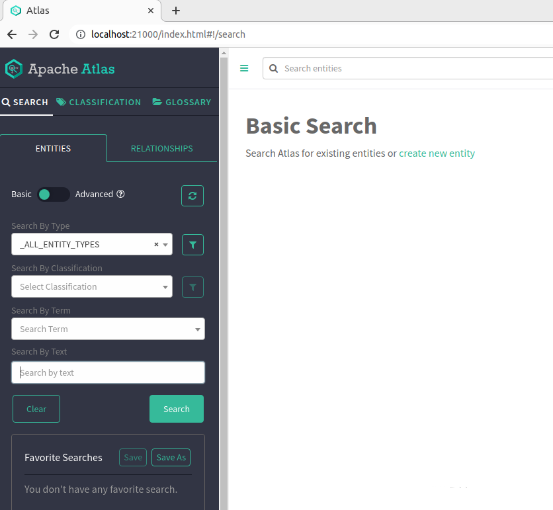
停止 Atlas,运行以下命令:
1
2python2 bin/atlas_stop.py
bin/atlas_stop.py
五、出现的错误
编译过程
- 错误一,缺失 jar 包;原因是缺少上一步的依赖包 org.restlet.jee;解决方式:安装上面步骤安装 jar 包,重新进行编译即可;错误详情如下:
1
2
3
4
5
6
7
8
9
10[ERROR] Failed to execute goal on project atlas-testtools: Could not resolve dependencies for project org.apache.atlas:atlas-testtools:jar:2.3.0: Failed to collect dependencies at org.apache.solr:solr-test-framework:jar:8.6.3 -> org.restlet.jee:org.restlet:jar:2.4.3: Failed to read artifact descriptor for org.restlet.jee:org.restlet:jar:2.4.3: Could not transfer artifact org.restlet.jee:org.restlet:pom:2.4.3 from/to maven-restlet (https://maven.restlet.com): Transfer failed for https://maven.restlet.com/org/restlet/jee/org.restlet/2.4.3/org.restlet-2.4.3.pom: PKIX path validation failed: java.security.cert.CertPathValidatorException: validity check failed: NotAfter: Mon Nov 14 01:05:56 CST 2022 -> [Help 1]
[ERROR]
[ERROR] To see the full stack trace of the errors, re-run Maven with the -e switch.
[ERROR] Re-run Maven using the -X switch to enable full debug logging.
[ERROR]
[ERROR] For more information about the errors and possible solutions, please read the following articles:
[ERROR] [Help 1] http://cwiki.apache.org/confluence/display/MAVEN/DependencyResolutionException
[ERROR]
[ERROR] After correcting the problems, you can resume the build with the command
[ERROR] mvn <args> -rf :atlas-testtools - 错误二,安装 node 失败;解决方式:手动安装 node 后再次执行编译命令;错误详情如下:
1
2
3
4
5
6
7
8
9
10
11
12
13
14
15
16INFO] ------------------------------------------------------------------------
[INFO] BUILD FAILURE
[INFO] ------------------------------------------------------------------------
[INFO] Total time: 01:02 h
[INFO] Finished at: 2023-06-15T18:38:46+08:00
[INFO] ------------------------------------------------------------------------
[ERROR] Failed to execute goal com.github.eirslett:frontend-maven-plugin:1.4:install-node-and-npm (install node and npm) on project atlas-dashboardv2: Could not download Node.js: Got error code 500 from the server. -> [Help 1]
[ERROR]
[ERROR] To see the full stack trace of the errors, re-run Maven with the -e switch.
[ERROR] Re-run Maven using the -X switch to enable full debug logging.
[ERROR]
[ERROR] For more information about the errors and possible solutions, please read the following articles:
[ERROR] [Help 1] http://cwiki.apache.org/confluence/display/MAVEN/MojoFailureException
[ERROR]
[ERROR] After correcting the problems, you can resume the build with the command
[ERROR] mvn <args> -rf :atlas-dashboardv2
- 错误一,缺失 jar 包;原因是缺少上一步的依赖包 org.restlet.jee;解决方式:安装上面步骤安装 jar 包,重新进行编译即可;错误详情如下:
启动过程
- 错误一,找不到 slor 的配置文件,解决方式:按照错误描述从安装目录下将文件
apache-atlas-2.3.0\solr\server\solr\solr.xml复制到apache-atlas-2.3.0\data\solr下,然后重新运行启动命令;错误详情如下:1
2
3
4
5
6
7
8
9
10
11
12
13
14
15
16
17
18
19
20
21
22
23
24
25Configured for local HBase.
Starting local HBase...
Local HBase started!
Configured for local Solr.
Starting local Solr...
solr.xml doesn't exist in D:\atlas-2.3.0\apache-atlas-2.3.0\data\solr, copying from D:\atlas-2.3.0\apache-atlas-2.3.0\solr\server\solr\solr.xml
Exception: [WinError 2] 系统找不到指定的文件。
Traceback (most recent call last):
File "D:\atlas-2.3.0\apache-atlas-2.3.0\bin\atlas_start.py", line 173, in <module>
returncode = main()
^^^^^^
File "D:\atlas-2.3.0\apache-atlas-2.3.0\bin\atlas_start.py", line 135, in main
mc.run_solr(mc.solrBinDir(atlas_home), "start", mc.get_solr_zk_url(confdir), mc.solrPort(), logdir, True, mc.solrHomeDir(atlas_home))
File "D:\atlas-2.3.0\apache-atlas-2.3.0\bin\atlas_config.py", line 605, in run_solr
runProcess(copyCmd, logdir, False, True)
File "D:\atlas-2.3.0\apache-atlas-2.3.0\bin\atlas_config.py", line 261, in runProcess
p = subprocess.Popen(commandline, stdout=stdoutFile, stderr=stderrFile, shell=shell)
^^^^^^^^^^^^^^^^^^^^^^^^^^^^^^^^^^^^^^^^^^^^^^^^^^^^^^^^^^^^^^^^^^^^^^^^^^^^^^^^
File "D:\Program Files\Python311\Lib\subprocess.py", line 1026, in __init__
self._execute_child(args, executable, preexec_fn, close_fds,
File "D:\Program Files\Python311\Lib\subprocess.py", line 1538, in _execute_child
hp, ht, pid, tid = _winapi.CreateProcess(executable, args,
^^^^^^^^^^^^^^^^^^^^^^^^^^^^^^^^^^^^^^^
FileNotFoundError: [WinError 2] 系统找不到指定的文件。 - 错误二,执行
jps,发现 HBase 和 Solr 并没有随 Atlas 一起启动,查看日志文件有如下错误;原因是 HBase 没启动成功,可尝试手动启动 HBase:1
2[main:] ~ Retrieve cluster id failed (ConnectionImplementation:576)
java.util.concurrent.ExecutionException: org.apache.zookeeper.KeeperException$ConnectionLossException: KeeperErrorCode = ConnectionLoss for /hbase/hbaseid
- 错误一,找不到 slor 的配置文件,解决方式:按照错误描述从安装目录下将文件
原文链接: https://xinghuipeng.pages.dev/2023/06/29/work/bigdata/Apache-Atlas简单安装/
版权声明: 转载请注明出处.